 It pays to pay with Onestpay

Summary
- Keep your current debit card. Link an eligible card to OnestPay. Your spending money stays in checking until you authorize a purchase.
- Start in OnestPay to earn cashback. Choose a participating brand, review the offer, and pay with the code OnestPay generates.
- See what you’ll earn before you pay. The brand’s offer determines the cashback, which is credited separately to your OnestPay wallet.
Before you pay You can see the cashback offer before authorizing your purchase.
The bill arrives at your favorite restaurant. You reach for your debit card because you’d rather pay from checking and be done with it. But you’ve probably wondered why the same dinner can earn cashback on a credit card while your debit card earns little or nothing.
OnestPay gives you another way to pay that bill. You link the debit card you already have, choose the restaurant in OnestPay, and see the available cashback before you authorize the purchase. OnestPay charges your linked card and gives you a payment code to use at checkout. You pay from your existing checking account and earn cashback on the eligible purchase.
What does an OnestPay purchase look like at checkout?
Suppose you’re at a participating restaurant and your total is $60. You open OnestPay, find the restaurant, and see an offer for 5% cashback. You enter $60, confirm the amount, and authorize the charge to your linked debit card. When the payment code appears, you show it to the cashier to pay the bill. Once the eligible purchase is complete, $3 in cashback goes to your wallet.
- Charged to checking
- $60.00
- Cashback in your wallet
- +$3.00
- Effective cost after cashback
- $57.00
The 5% rate is illustrative. The offer shown for the brand before you authorize payment determines what you can earn. The $57 figure reflects the $3 reward. Your checking account still needs to cover the full $60 purchase.
The same approach works online when the brand accepts the code there. Once your cart total is ready, check the brand’s offer in OnestPay, authorize the amount you intend to pay, and enter the code as directed at checkout.
Why don’t debit cards offer rewards like credit cards?
When you pay with a debit or credit card, the merchant pays a processing fee. Part of that fee, called interchange, goes to the bank that issued your card. Banks can use some of that revenue to help fund credit card rewards.
In October 2011, a Federal Reserve rule implementing the Durbin Amendment capped debit card interchange fees for many large banks. Credit card transactions fall outside that cap. In 2024, debit transactions subject to the cap averaged 22 to 24 cents in interchange, depending on the payment network. Federal Reserve debit interchange data
A 2025 Progressive Policy Institute report compared interchange fees on the same $40 retail purchase using 2024 Visa and Mastercard rates.
| Payment method | Interchange fee on a $40 purchase |
|---|---|
| Visa or Mastercard debit card subject to the cap | About 23¢ |
| Visa or Mastercard credit card in the report’s examples | About 67¢ to 94¢ |

In these examples, a credit card purchase generated about three to four times as much interchange revenue as a debit card purchase subject to the cap. Progressive Policy Institute report
Credit card issuers can use part of that interchange revenue to give customers cashback, points, or miles. Banks subject to the debit cap earn much less interchange on a comparable purchase, making it harder to fund similar rewards on everyday debit spending.
How does OnestPay solve this problem?
We believe responsible spending should earn rewards. If you prefer to pay with money you already have, you should be able to earn cashback on purchases you planned to make. After plenty of trial and error, OnestPay developed a way to bring cashback to the debit card you already use. The idea was to fund the reward through discounts from participating brands, so earning cashback doesn’t depend on whether your bank offers debit rewards.
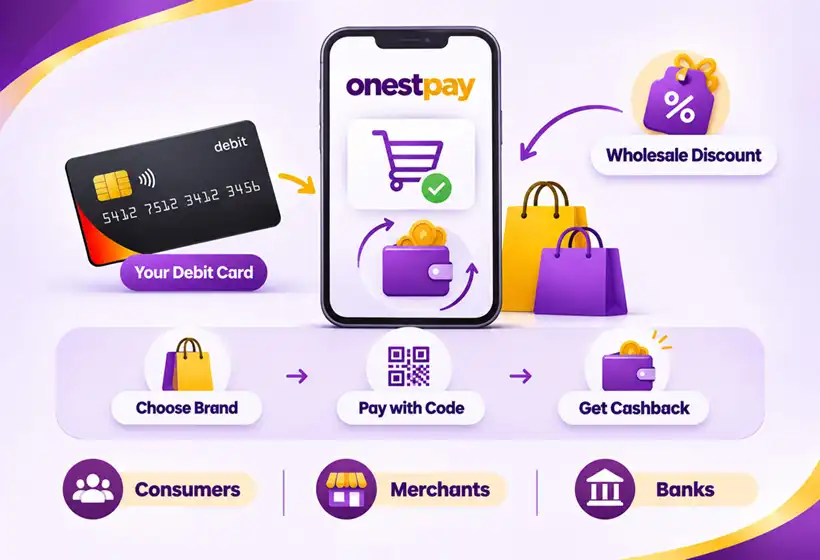
Many large and midsize retailers issue gift cards and make them available at a discount through wholesale distributors. OnestPay works with those distributors to buy merchant-specific value for less than face value. That wholesale discount is what funds your cashback.
When you authorize a purchase with your linked debit card, OnestPay buys the corresponding value for that brand through its wholesale partners. At checkout, you see the amount you’re paying, the cashback you’ll earn, and the payment code you use with the merchant. OnestPay credits a portion of the wholesale discount to your wallet as cashback.
Behind the scenes OnestPay handles the wholesale purchase. There’s nothing extra for you to buy or manage.
- Consumers can earn cashback on eligible purchases using their existing debit card and checking account.
- Merchants can use cashback offers to attract shoppers and encourage repeat visits.
- Banks can give customers another reason to use their existing debit cards, with cashback funded through merchant discounts.
You
Choose a participating brand, approve the amount, and show or enter your payment code.
OnestPay
Handles the wholesale purchase behind the scenes, provides your payment code, and credits cashback to your wallet.
What is an OnestPay linked debit card?
It’s the debit card you already use, connected to your OnestPay wallet. OnestPay works with eligible debit cards from any U.S.-based bank or credit union. You keep your bank or credit union, your checking account, and your existing debit card.
To get started, complete a one-time setup for each debit card you choose to link. Linking a card doesn’t move money out of your account or require you to load your wallet. Once your card is linked, you can select it when you pay through OnestPay and earn cashback on eligible purchases.
No OnestPay fees OnestPay charges no fees to link your card or pay. Your bank or credit union’s usual account terms still apply.
How do you pay with OnestPay and earn cashback?
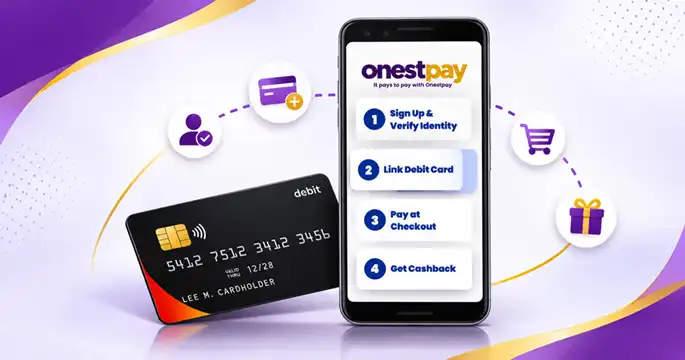
1. Create your OnestPay wallet
Sign up and verify your email address and mobile number. Your wallet is where you manage your linked payment method and see the cashback you’ve earned.
2. Link your existing debit card
Add your eligible debit card and complete the verification steps. Linking the card makes it available to use when you check out through OnestPay. Your spending money stays in your checking account until you authorize a purchase.
3. Choose a brand and pay with your code
When you’re ready to pay, open OnestPay and select the participating brand. Enter the amount you want to pay and review the cashback offer before authorizing the transaction. After you approve it, OnestPay charges your linked debit card and generates a single-use payment code for that brand.
In a store or restaurant, show the code to the cashier. When shopping online, follow the brand’s instructions for entering the code at checkout. Check the offer details first so you know where the code is accepted.
4. Earn cashback in your wallet
OnestPay credits cashback to your wallet when your eligible purchase is complete. The charge to your checking account and the cashback credit are separate. For example, if you authorize a $60 purchase and earn $3 back, your debit card is charged $60 and your OnestPay wallet receives $3.
How does OnestPay compare with regular debit and credit cards?
A regular debit purchase and an OnestPay purchase both draw from your checking account. The difference is how you check out and where any reward comes from. A credit card purchase goes on your credit card account and is repaid later under the issuer’s terms.
| Regular debit card | Debit card linked to OnestPay | Credit card | |
|---|---|---|---|
| Where the purchase is funded | Your checking account | Your existing checking account | Your credit line |
| How you pay | Use your debit card at checkout | Start in OnestPay and use the brand’s payment code | Use your credit card at checkout |
| Where rewards come from | Your bank’s program, if it offers rewards | The participating brand’s offer in OnestPay | Your card issuer’s rewards program, if available |
| What to check before paying | Any rewards your bank offers for the purchase | Brand participation, cashback rate, and where the code is accepted | Rewards eligibility and any applicable fees or interest |
If you already prefer debit because you want purchases to come straight out of checking, OnestPay adds a way to earn rewards at participating brands. The trade-off is the extra step at checkout. You open OnestPay, select the brand, and generate a code. Seeing the dollar value of the reward up front helps you decide when that step is worth it.
What should you check before you pay?
Is the brand available? Browse Cashback by Brands to see which merchants participate. Start with places already in your budget, such as a restaurant you visit regularly or a retailer where you plan to place an order.
Where can you use the code? Check whether the offer applies online, in-store, or both. If you’re already at the register, confirm that the code is accepted for the purchase you’re about to make.
How much will you earn in dollars? A 5% offer on $60 earns $3. A higher percentage can catch your eye, but the purchase price still matters. If one store charges $60 and gives you $3 back while another sells the same item for $55, the $55 price costs less.
Is the amount final? If you’re shopping online, check your total after tax, shipping, and any discounts before generating the code. At a restaurant, check the final amount you intend to pay. Your checking account funds the amount you authorize.
Frequently asked questions
Do I need to open a new checking account or get a new card?
You can link your existing eligible debit card and keep using the checking account you already have. OnestPay doesn’t require a new debit card or a switch to a different bank.
Do I need to deposit money into my OnestPay wallet first?
Your linked debit card funds the purchase when you authorize it. The wallet is where your earned cashback is credited. There’s no need to move your spending money into the wallet ahead of time.
Do I earn cashback every time I use my debit card?
OnestPay cashback applies to eligible purchases started in OnestPay at participating brands. If you use your debit card directly at checkout, your bank’s usual terms apply.
Does OnestPay charge a fee to use my linked debit card?
OnestPay doesn’t charge a fee to use the service. Your bank’s terms still apply to your debit card and checking account.
Can I use the same payment code at a different store?
The code is issued for the brand you selected. Follow that brand’s instructions and check where the code is accepted before authorizing payment.
Where do I see the cashback I earned?
Check your OnestPay wallet after your eligible purchase is complete. The cashback appears there as a separate credit from the purchase charge to your debit card.
Start with a purchase you already planned
The next time you’re about to order dinner or buy something online, look up the brand in Cashback by Brands. If there’s an offer, check the rate, see where the code is accepted, and decide whether to pay through OnestPay. A planned purchase is an easy way to try the checkout process and see what your existing debit card can earn.