PAY ONLINE OR IN STORE · ONESTPAY

Pay with OnestPay.
Make everyday spending more rewarding.

Choose a merchant, enter your checkout amount and confirm using your linked debit card. Use your secure payment code at checkout, following the merchant’s instructions.
💳
Your existing debit cardNo new card required.
✓
No advance fundingYour debit card funds the purchase when you confirm.
%
Earn eligible cashbackRewards credit after completion and confirmation.
Open OnestPay →   Explore the payment flow ↓
Pay with OnestPay

From your phone to checkout in four steps.

Make sure your account is verified and your debit card is linked before paying.

1
📱

Open OnestPay

Sign in and open the payment flow.

2
🛍️

Choose Merchant & Amount

Select the merchant, enter the final total and review the offer.

3
✓

Confirm & Get Your Code

Confirm payment with your linked debit card and receive your payment code.

4
%

Pay & Earn Cashback

Use the code as instructed. Eligible cashback credits after completion and confirmation.

Pay with OnestPay

Choose your merchant and checkout amount. Preview the steps before making a purchase in OnestPay.

INTERACTIVE PREVIEW · NO CHARGE

Your purchase details

Use the final amount you need to pay, including applicable taxes and other checkout charges. Review merchant amount requirements in OnestPay.

Linked debit cardDemo card · •••• 1234Illustrative card details. Do not enter real card information here.

By clicking “Get Code,” you agree to allow PlusGiftCard, Inc. to initiate a one-time or recurring transaction electronic funds transfer (debit/credit) from your linked card in the amount you specify. You confirm that you are the authorized owner of the account, and you may revoke this authorization at any time prior to the initiation of a transaction. You also agree to be bound by the PlusGiftCard Terms and Conditions processing and transaction responsibilities.

Preview only: no funds will be moved and no valid payment code will be issued.

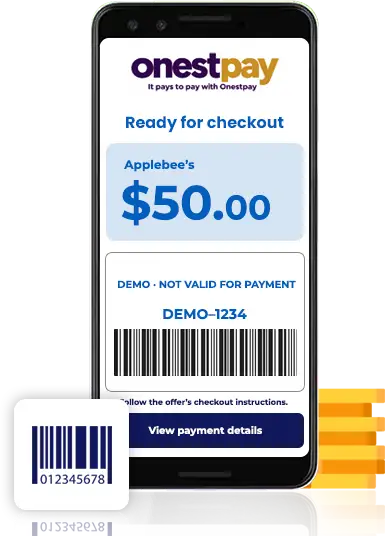
Your payment code, explained.

▦
Illustrative merchantFollow the current offer’s instructions
Single use
DEMO–1234
Demo payment code · Not valid for payment
Illustrative amount
$50.00
✓
Selected merchant

Use the code only at the merchant shown.

✓
Confirmed amount

Check the purchase amount before authorizing payment.

✓
Checkout instructions

Use the code, barcode or other supported method shown by the offer.

✓
Cashback after completion

Eligible rewards credit to your OnestPay wallet after the purchase is completed and confirmed.

Pay online or in store.

Available checkout methods depend on the merchant’s current offer.

💻

Online checkout

Enter the generated payment code and any required PIN in the checkout fields specified by the merchant’s instructions.

📱

In-store checkout

Present the code or supported barcode to the cashier as instructed. Use a QR code only when the offer supports it.

Questions about paying with OnestPay

Do I need a new debit card?

No. Link your existing debit card to your verified OnestPay account.

Do I have to move money in advance?

No advance wallet funding is required. Your linked debit card funds the purchase when you confirm it.

Can I pay at any merchant?

Use a merchant with an available OnestPay offer. Check the current acceptance instructions and amount requirements.

When will cashback appear?

Cashback credits when an eligible purchase is completed and confirmed. Review the offer’s current rate and terms before payment.

Is this page making a real payment?

No. The form is an interactive preview. Sign in to OnestPay to review and authorize a real purchase.

What if I need help with a payment code?

Check your transaction details and the merchant instructions in OnestPay. Contact support if you need assistance.

Ready for your next purchase?

Open OnestPay, choose your merchant and review the offer.

Open OnestPay →