 It pays to pay with Onestpay

How to keep your current debit card, pay through OnestPay, and earn cashback at participating brands.
You already have a debit card you use for everyday spending. OnestPay gives you another way to use it. Link your card, check the cashback offer for a participating brand, and pay with a code generated for that purchase. Your checking account funds the payment, and the cashback goes to your OnestPay wallet.
At a glance
Keep your bank and debit card. Link each card once. Pay no OnestPay fees to link or pay. There are no cashback earnings caps or quarterly categories to activate.
1. What is an OnestPay linked debit card?
It’s your existing debit card connected to your OnestPay wallet. The link lets you select that card to fund a purchase you start in OnestPay. You still use the checking account associated with the card.
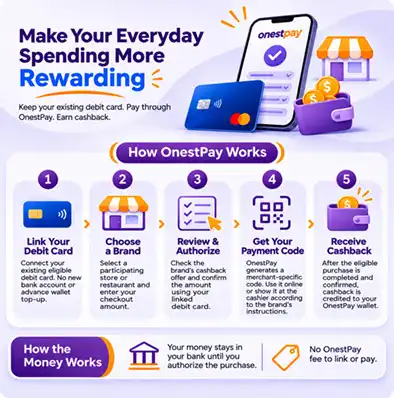
Here’s what changes at checkout. You select the brand in OnestPay, review its cashback offer, and authorize the amount. OnestPay then gives you a payment code to use with that brand. Linking gives you this additional way to pay while your physical card continues to work as usual.
2. Do I need to switch banks or get a new debit card?
You can keep your current bank or credit union, checking account, and debit card. OnestPay works with eligible debit cards issued by U.S. banks and credit unions.
To get started, create your OnestPay wallet, add the debit card you want to use, and complete the verification steps. Setup is a one-time step for each card you choose to link. Once linked, you can select that card when you authorize an OnestPay purchase.
3. Does linking my card move money out of my bank account?
Linking the card leaves your money in checking. You don’t need to transfer a starting balance to OnestPay or top up a wallet before shopping.
Your debit card is charged when you authorize a purchase. If you authorize a $60 payment, your checking account needs to cover the full $60. Any cashback you earn appears separately in your OnestPay wallet.
4. Does OnestPay charge any fees?
OnestPay charges no fees to link your debit card or pay through OnestPay. When you authorize a purchase, your linked card funds the amount you approved. Your bank or credit union’s usual terms still apply to your card and checking account.
For example, if you authorize $60 for a restaurant purchase, the linked debit card funds the $60 payment. If the offer earns $3, that reward is credited separately to your wallet.
5. How do I pay with OnestPay in-store or online?
- Choose the participating brand. Open OnestPay and find the store or restaurant where you’re about to pay.
- Enter the amount. Use the amount you intend to pay. For online orders, check the total after taxes, shipping, and discounts.
- Review and authorize. Check the cashback offer and approve the payment with your linked debit card. OnestPay generates a payment code for the selected brand.
- Use your payment code. Show it to the cashier in-store or enter it online according to the brand’s checkout instructions.
Before generating a code
Check whether the brand accepts its code online, in-store, or both. The code is for the brand you select.
6. Will I earn cashback every time I tap or swipe my debit card?
OnestPay cashback applies to eligible purchases you start in OnestPay at participating brands. When you pay by tapping or swiping your card directly, your bank’s usual debit card terms apply.
| If you… | What happens |
|---|---|
| Tap or swipe your debit card directly | Your bank processes an ordinary debit purchase under its usual terms. |
| Start in OnestPay and pay with the brand’s code | Your linked card funds the purchase, and OnestPay credits cashback on an eligible transaction. |
7. Are there any cashback caps or categories to activate?
There’s no cap on how much OnestPay cashback you can earn. There are no rotating categories to track and no categories to select or activate each quarter.
If you make eligible purchases at a participating restaurant and a participating retailer, you can earn the cashback shown for each purchase. There’s no need to pick dining over shopping for the quarter. Just check the brand’s offer when you’re ready to pay.
8. How do I know how much cashback I’ll earn?
Browse Cashback by Brands to see available offers. Rates vary by brand. Select the brand and enter your purchase amount to review the offer before authorizing payment.
Suppose a participating restaurant has a 5% cashback offer and your bill comes to $60. Here’s what that purchase would look like.
| Restaurant checkout example | Amount |
|---|---|
| Charged to your linked debit card | $60.00 |
| Cashback credited to your OnestPay wallet | +$3.00 |
| Effective cost after accounting for cashback | $57.00 |
The 5% rate is illustrative. Your checking account is charged the full $60 in this example. The $57 figure accounts for the separate $3 wallet credit.
9. Where does the cashback come from if my bank doesn’t offer debit rewards?
Participating brands make gift card value available at a discount through wholesale distributors. When you authorize a purchase, OnestPay uses that infrastructure to obtain payment value for the brand you selected. It shares part of the wholesale discount with you as cashback. That’s how you can earn a reward even if your bank doesn’t offer debit card cashback.
OnestPay handles the wholesale purchase behind the scenes.
There’s nothing extra for you to buy or manage. At checkout, you simply use the payment code OnestPay provides.
10. Where does my cashback go, and when can I see it?
OnestPay credits your cashback to your OnestPay wallet when the eligible purchase is complete. Open your wallet to see the reward.
The payment and the reward appear in two places. In the restaurant example, your bank account shows the $60 debit charge, and your OnestPay wallet shows the $3 cashback credit.
Explore cashback by brand
Look up a store or restaurant where you already plan to shop. Review its cashback offer and where the payment code is accepted, then decide how you want to pay.